Batch capture, in order
Grab one region or queue an entire flow. Every capture lands in an ordered session with its source app attached, so you know where it came from later.
SnipMark is a native screenshot workspace for Mac and iPhone. Capture a region, mark it with sharp vectors, then compress and rename the batch on device — without uploading anything.
Guide: capture and annotate screenshots on Mac
Free · Pro $9.99
SnipMark Pro is $0 through Nov 19, 2026 — check $0 in the App Store upgrade sheet before confirming.
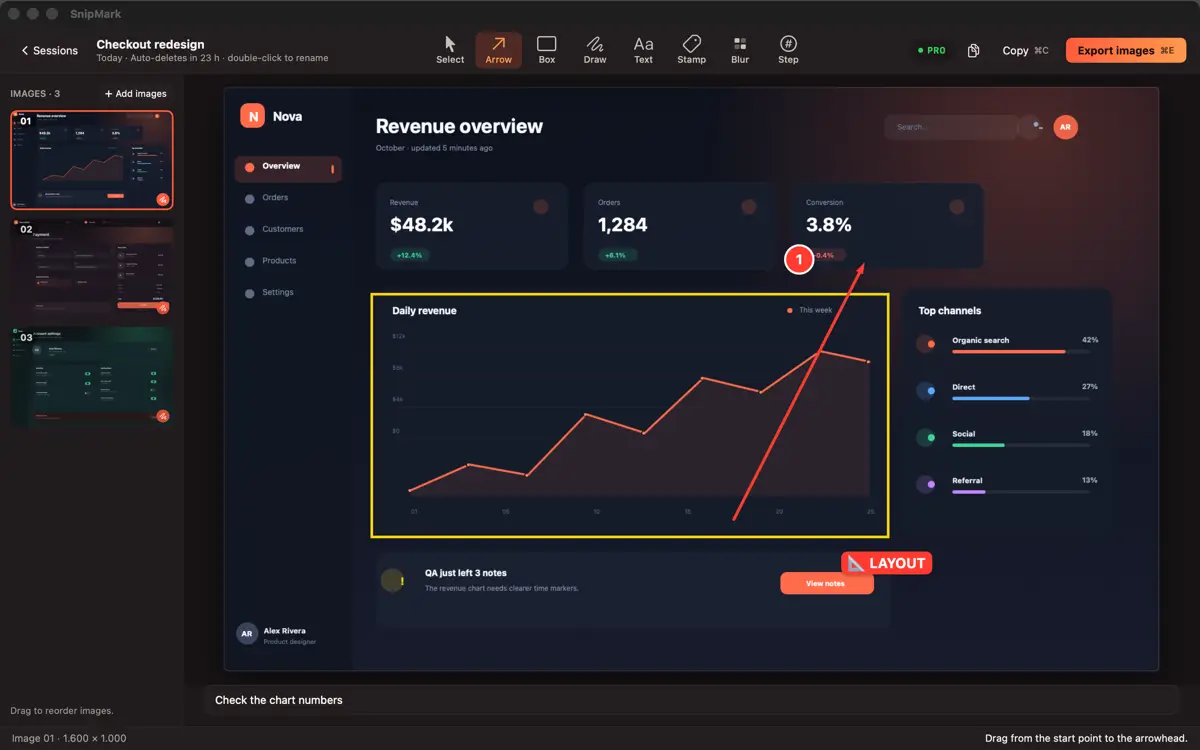
Stop juggling preview windows, Finder and resizers. The capture, annotations, and export live in one smooth session.
Grab one region or queue an entire flow. Every capture lands in an ordered session with its source app attached, so you know where it came from later.
Vector arrows, shapes, text, and stamps remain sharp at different export sizes. Blur is applied directly to the image content. Build your own stamp set with Pro.
Shrink a set to sharing size and rename it with a pattern in the same step. No quality surprises, no 01-final-final files.
There is no image server and no account system to trust.
SnipMark provides the exact same capabilities regardless of how you install it. Free to start, one-time upgrade to Pro.
SnipMark Pro is $0 through Nov 19, 2026 — check $0 in the App Store upgrade sheet before confirming.
App Store Pro $9.99 · One-time purchase · Universal Purchase
SnipMark is distributed on the App Store as a Universal Purchase for Mac, iPhone, and iPad with Apple ID billing and Family Sharing. A standalone Direct Mac edition is not currently offered.
Open System Settings → Privacy & Security → Screen Recording, enable SnipMark, then quit and reopen the app. macOS asks for this permission once so SnipMark can capture regions when triggered.
In any app with a Share button: tap Share → More → SnipMark. If it is not listed, scroll to the bottom of the share sheet, tap Edit Actions and enable SnipMark.
Never. Capture, annotation, compression, renaming, and export all execute 100% on-device. No telemetry, no image hosting, and no tracking.
Select Restore Purchases while signed in to the Apple Account you used to purchase Pro on your Mac, iPhone, or iPad.
Working sessions automatically clear themselves 24 hours after their last edit, or you can delete them immediately in the workspace. Exports saved to your disk remain your personal property.
SnipMark processes screenshots 100% on your Mac, iPhone, and iPad.
Pro is a single one-time purchase. No recurring fees.
Step-by-step guides for capturing, marking up, and stitching screenshots on Mac and iPhone.
 DiskLuma
 SizeMino