01
Select only what you want
Use the system photo picker, Files, Finder drag-and-drop, or the Share sheet without granting access to your entire library. Originals are never overwritten.

Compress photos and videos locally with Quick presets or Fit a limit in KB, MB, or %. Compare original and compressed side by side before you save or share — nothing is uploaded and originals stay untouched.
Compress photos and videos under a size limit
Free · Pro $14.99 · iOS 18+ · macOS 15+ · Android 11+
SizeMino — Media compressor
No newsletter, no drip campaign. One message on the day it ships.
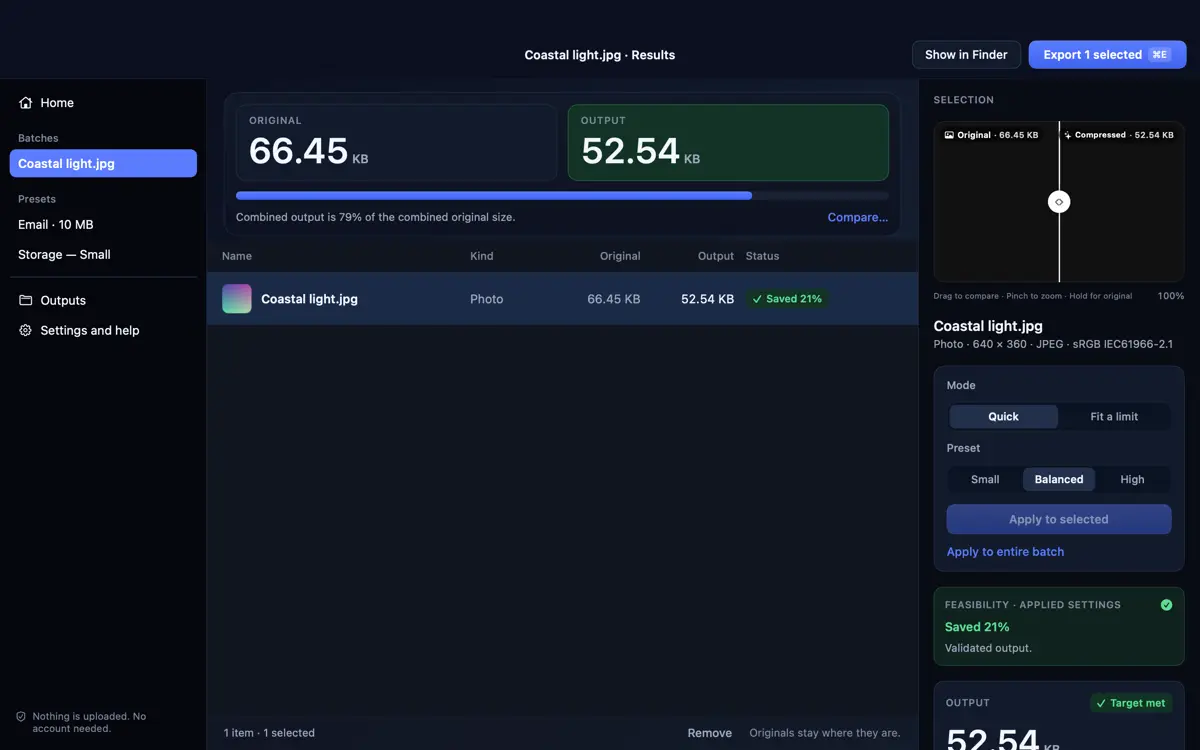
Pick files with the system picker, set a preset or limit, then verify the actual output.
Use the system photo picker, Files, Finder drag-and-drop, or the Share sheet without granting access to your entire library. Originals are never overwritten.
Pick Small, Balanced, or High presets, resize to 4K, 2K, Full HD, HD, 480p, % or custom px without upscaling, or target a specific KB, MB, or % limit.
Compare before and after visually and check actual output bytes. If a file stays over target or looks too soft, adjust settings and recompress straight from Results.
SizeMino reports actual output sizes, flags files that miss a target or grow larger, and lets you keep the original when compression cannot beat it.
Run single photos with Small (1600 px), Balanced (2560 px), or High (4096 px) presets and compare original vs compressed side by side.
Resize to 4K, 2K QHD, Full HD, HD, SD 480p, a percentage, or a custom long edge. Larger targets are disabled so photos are never upscaled.
Queue batches of photos and videos and target an exact byte limit or percentage reduction, choosing Lower resolution first or Best effort.
Processing happens locally. Temporary outputs stay in app storage until you export or share, and originals remain untouched in your library.
SizeMino is built natively for Apple and Android. Apple ships photo and video compression together; Android prioritizes photo compression first with video planned for a later update.
| Capability | iPhone, iPad & Mac | Android (Google Play) |
|---|---|---|
| Photo compression (JPEG, PNG, HEIC) | iOS 18+, iPadOS 18+, macOS 15+ | Android 11+ (plus WebP) |
| Video compression (SDR) | Included in v1 | Planned in later phase |
| HDR media | Blocked in current build (use SDR) | Blocked in current build (use SDR) |
| Quick presets & visual compare | Included | Included |
| Fit a limit (KB, MB, or %) | Included | Included for photos |
| Resize without upscaling | 4K / 2K / 1080p / 720p / 480p / % / px | 4K / 2K / 1080p / 720p / 480p / % / px |
| Share sheet / Finder integration | Share Extension & Finder Quick Action | Android Share intake |
| Purchase & licensing | Apple Universal Purchase + Family Sharing | Google Play (separate purchase) |
No subscriptions and no watermarks. Prices vary by local store currency.
No account required · free forever
One-time purchase · iPhone, iPad & Mac
One-time purchase · Android devices
Pro $14.99 · One-time purchase · Apple Universal Purchase · Google Play
No. Compression runs entirely on your device. No SizeMino account is needed, and your photos or videos are never uploaded.
No. SizeMino writes compressed results into local app storage until you export or share them. Originals remain untouched in Photos, Gallery, or Finder.
Targets use exact output bytes (1 KB = 1,000 B, 1 MB = 1,000,000 B). Some files or long videos cannot hit a very small limit at a watchable quality. SizeMino labels results that miss the target or grow larger and lets you adjust settings or keep the original.
Quick presets and Auto resize cap the long edge (1600 px for Small, 2560 px for Balanced, 4096 px for High) to save space. You can switch Size to Original if you want to keep full dimensions.
Not in the current release. HDR video and photos with an HDR gain map are currently blocked while HDR preservation is completed; choose standard SDR media.
On Apple platforms, SizeMino Pro uses Universal Purchase so one purchase covers iPhone, iPad, and Mac (with Family Sharing). Purchases on Google Play are separate and cannot be transferred between Apple and Google.
On-device photo and video compression for iPhone, iPad, Mac, and Android. Leave your email to be notified on launch day.
One-time purchase per store ecosystem. No subscriptions, no watermarks.
Practical guides for hitting file size limits, resizing photos and shrinking videos on device.
 DiskLuma
 SnipMark