01
Strict permission boundaries
In the Direct DMG edition, scanning and cleanup remain subject to macOS system permissions. In the Mac App Store edition, you choose folders explicitly through the macOS open panel.

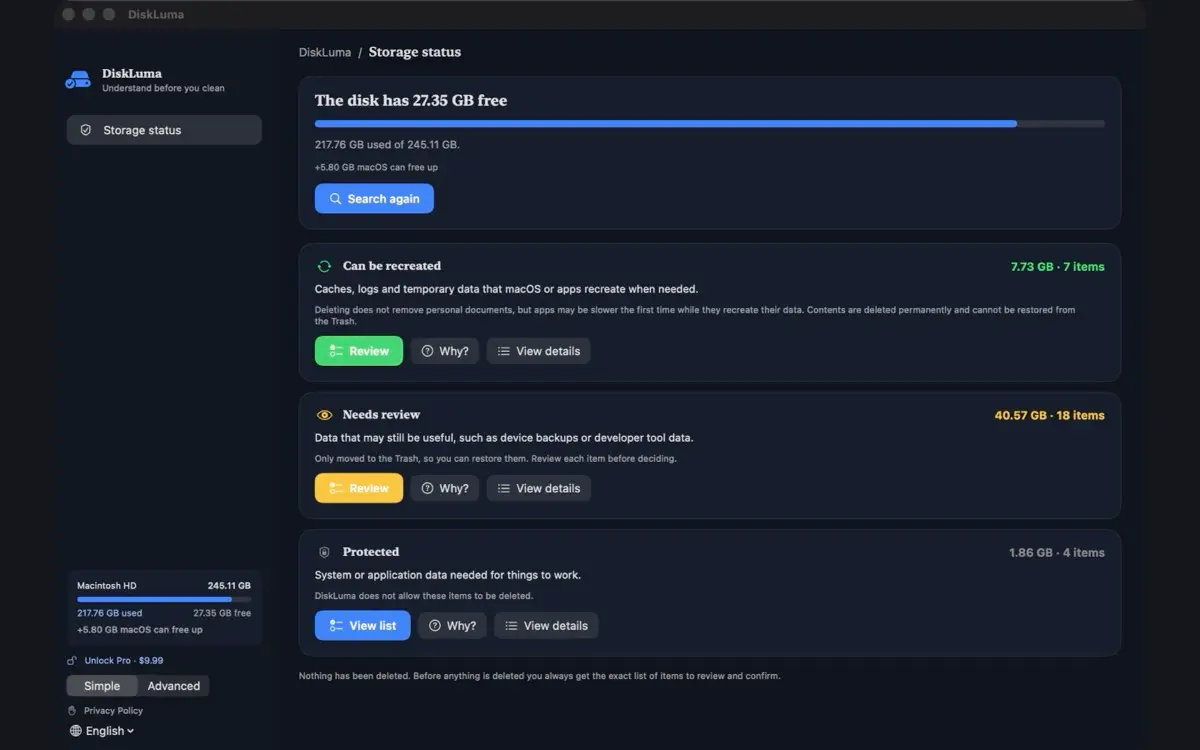
DiskLuma visualizes what takes up space and sorts items into clear groups: recreatable caches, items to review, and protected essentials. No surprises, nothing deleted without your explicit confirmation.
Free · Pro $9.99 · macOS 12+
DiskLuma — Storage cleaner
No newsletter, no drip campaign. One message on the day it ships.
Three rules decide how DiskLuma touches your storage.
In the Direct DMG edition, scanning and cleanup remain subject to macOS system permissions. In the Mac App Store edition, you choose folders explicitly through the macOS open panel.
Every scan result displays its full path, its category, and the technical explanation of why it is there. You inspect and verify the exact removal queue before any cleanup begins.
DiskLuma shows how each item will be handled before cleanup. Eligible temporary caches may be permanently removed after confirmation. Supported user files and applications are moved to Trash. Always review the removal list before proceeding.
Switch between Simple and Advanced modes depending on how much detail you need. Treemap analysis, duplicate inspection, and storage history are included in Free. Pro adds batch cleanup and deeper removal workflows.
Explore your drive with an interactive visual treemap. Track storage growth over 7, 30, and 180 days across repeated scans to catch runaway directories early.
Pinpoint bulky caches, developer build artifacts (Xcode DerivedData, node_modules), and duplicate files verified byte-by-byte with SHA-256.
Uninstall applications along with their hidden container remnants, Application Support caches, and preferences that dragging to Trash leaves behind.
Keep an eye on available disk volume directly from the macOS menu bar or desktop widget, and receive gentle alerts before free space hits critical thresholds.
Download the notarized Direct DMG today with broader macOS-permitted access and a standalone one-time license. The sandboxed Mac App Store edition uses Apple ID billing.
| Capability | Mac App Store | Direct DMG |
|---|---|---|
| Visual Treemap & Storage Analysis | Full support | Full support |
| Duplicates Finder (SHA-256 matching) | Full support | Full support |
| Historical Growth Tracking (7 / 30 / 180d) | Full support | Full support |
| Menu Bar Monitor & Desktop Widget | Full support | Full support |
| App Uninstaller & Leftover Removal | Sandboxed scope | Extended system scope |
| System & Privileged Cleanup | No (Sandbox restricted) | Yes (macOS permitted paths) |
| Environment & Security | Apple App Sandbox | Hardened Runtime + Notarized |
| Update Mechanism | Mac App Store automatic | Sparkle native updater |
| License & Purchases | Apple ID & Family Sharing | Independent license key |
Scan, inspect, and visualize your disk for free. Upgrade to Pro when you want batch cleanup and deep uninstallation.
Available on both editions · free forever
One-time in-app purchase
One-time purchase · Freemius · up to 5 personal Macs
Direct Mac Pro $9.99 · One-time purchase · Mac App Store — Coming Soon
The Direct DMG edition runs outside App Sandbox with Hardened Runtime & Apple Notarization, covering broader macOS-permitted paths with an independent license. The Mac App Store edition uses App Sandbox and Apple ID billing.
Mac App Store purchases (tied to Apple ID & Family Sharing) and Direct DMG licenses (issued via Freemius for up to 5 personal Macs, transferable between your Macs) are separate and cannot be transferred between platforms.
Yes. Scanning, treemap visualization, duplicate identification, menu bar monitoring, single-item cleanup, and your first multi-item cleanup are free in the Direct DMG build — no payment required to evaluate.
DiskLuma clearly shows how each item will be handled before cleanup. Eligible temporary caches may be permanently removed after your confirmation. Supported user files and uninstalled applications are moved to the macOS Trash, where Put Back remains supported. Always review the removal list before confirming.
Scanning and analysis run locally on your Mac. The Direct DMG edition never uploads file names or folder trees; it connects online only to validate your license key and check for Sparkle updates.
DiskLuma requires macOS 12 Monterey or later. It is built as a native Universal binary running with maximum efficiency on Apple Silicon (M1/M2/M3/M4) as well as Intel-based Macs.
Download the notarized Direct Mac (DMG) edition now, or sign up for Mac App Store launch notifications.
Purchases are one-time and perpetual. No recurring subscriptions or automatic charges.
Step-by-step guides for the storage jobs DiskLuma handles.
 SnipMark
 SizeMino